Antivirus, and hope
Most attacks now start with a stolen password or a convincing invoice email, not a virus. Antivirus alone doesn't see them.

 Corporate & professional servicesLaw, accounting, finance and consulting firms, where client data and uptime are the business.
 Construction & infrastructureSite offices that move every year, crews in the field, and compounds that need watching after hours.
 Logistics & warehousingDocks, yards and racking where people and vehicles share the same floor.
 Mining & resourcesMines, quarries and resources sites, where remote crews, heavy vehicles and site systems all depend on the network.
 Retail & shopping centresMany sites, small teams on each, and cameras that should be doing more than recording.
 Aged careResidential aged care and retirement living.
 Healthcare & medicalClinics and practices with patient records to protect and systems that cannot go down.

Security that's switched on, and stays that way.
We've spent years securing enterprise and government organisations. Every computer protected, every sign-in secured, every setting checked twice a day and put back if it changes, and all of it written up for your insurer.
Security included in every plan, from $85 a person, a month.
Most businesses find out what's missing from their security on the day it's used against them. Right now, things are quietly going wrong, and nobody is being told.
In 2024–25, Australians reported a cybercrime every six minutes, and the average small-business report cost $56,600. Antivirus and a firewall alone don’t stop that. (ASD Annual Cyber Threat Report 2024–25)
Most attacks now start with a stolen password or a convincing invoice email, not a virus. Antivirus alone doesn't see them.

A setting switched off to fix one problem and never switched back. Nobody notices until it's used against you.

When your insurer or a customer asks what's switched on, the answer is a questionnaire and a best guess.
Your first step is free, with no obligation.
One onboarding, not two. Security comes with every support plan, so these steps run inside the same first 30 days as Managed IT. See the Managed IT timeline
A free Essential Eight gap check. No contract and no obligation, and you keep the results whatever you decide.
 Before you sign
A stolen password is the most common way in. So sign-ins come first, checked before they're enforced, so nobody gets locked out.
Protection goes on each computer in the background, and every mailbox and your domain are set up against scams.
Some of this depends on your plan. Every plan has the same security baseline
Bitdefender on Essential. CrowdStrike Falcon Complete on Advanced and Premium: endpoint detection and response, watched around the clock by CrowdStrike’s own security team.
Multi-factor sign-in on every app, with any exceptions agreed with you in writing. Passkeys for administrators. Old methods that skip MFA switched off.
Phishing and malware filtering, links checked when they're clicked, outside email labelled, and no automatic forwarding outside the business.
Records that stop others sending email as you, brought in stages so your real email keeps flowing.
Updates applied and monitored, disk encryption, the firewall on, no local admin rights for staff.
Work data stays inside the work apps behind a PIN. We never take over a personal phone. On Advanced and Premium, CrowdStrike Falcon for Mobile protects the phone on the plan too.




When your insurer or a customer asks what's switched on, you hand them a document, not a guess.
Security set up by hand drifts. Ours is checked every 12 hours: if a setting is changed, it's put back automatically and we're alerted.
 Every 12 hours
Threats are blocked automatically and our team is alerted. On Advanced and Premium, CrowdStrike's own security team is watching too, around the clock. Then we look into it, within your plan's response targets.
 Any day
The server, internet or Microsoft 365 is down and nobody can work
We respond within30 minutesEmail is down for the sales team
We respond within2 hoursA laptop won't print
We respond within4 hoursA new starter, or access to a shared folder
We respond within2 business daysResponse targets in business hours (9am to 5pm, Monday to Friday, except NSW public holidays) unless a plan says 24/7.
Projects close the rest of the Essential Eight, each scoped and quoted upfront, at a pace that suits you.
We set up every work computer so approved programs run, Office files from the internet can't run hidden code, and web browsers are locked down against common attacks. Your team works as normal; attackers find far fewer ways in.
Every computer and server backed up every day to a copy ransomware can't touch, with a test restore every three months. Separate from the email and OneDrive backup in Advanced and Premium.
Your Microsoft 365 email, OneDrive and shared mailboxes backed up every day, separately from Microsoft: the same Dropsuite backup that's in Advanced and Premium.
We find files like customer details, payroll and contracts, label them, and stop them being emailed or uploaded outside the business by mistake. Records are kept for as long as the law says you must.
Sensitive data labelled and protectedYour team signs in to the same work desktop from any computer, in the office or at home. It runs in Microsoft's Australian data centres, so company files never sit on personal devices. Best for teams who share computers or work in shifts.
A secure desktop from anywhereEach person gets their own Windows computer that lives in Microsoft's cloud, set up and secured by us. Open it from any laptop or tablet; if a device is lost or stolen, no company data goes with it. Best when each person needs their own PC.
A secure desktop from anywhereThe 10 things in cyber security, in plain English. Open any of them for the detail.
Every computer on your plan is protected: Bitdefender on Essential, and CrowdStrike Falcon Complete on Advanced and Premium. CrowdStrike adds endpoint detection and response: it records what happens on each computer, so an attack that uses no malware at all, such as a stolen password being misused, can be spotted and stopped.
On Advanced and Premium, CrowdStrike's own security team also watches every computer around the clock, hunts for hidden attackers, and steps in to stop an attack and clean it up: managed detection and response (MDR). CrowdStrike Spotlight also checks every computer for missing updates and known weaknesses, and Falcon for Mobile protects the phone or tablet on the plan.
Set up, kept current and looked after by us, on Windows PCs and Macs.
Key Benefits Bitdefender on Essential CrowdStrike on Advanced & Premium 24/7 Managed Detection & Response
Every computer on your plan is protected all the time, online and offline: CrowdStrike Falcon Complete on Advanced and Premium, and Bitdefender on Essential. Threats are blocked automatically, and our team is alerted when something doesn't look right, and acts on it in business hours.
On Advanced and Premium, CrowdStrike's own security team also watches every computer around the clock, and steps in to stop an attack at any hour. On Premium, urgent issues are answered 24/7.
Multi-factor sign-in on every app (with any exceptions agreed with you in writing), passkeys for administrators, and old sign-in methods that skip multi-factor switched off, on every plan. Sign-ins are allowed from approved countries only.
For the passwords themselves, 1Password for Business is an add-on we resell and set up: every person gets an encrypted vault that creates and fills strong, unique passwords on any device.
Key Benefits Multi-Factor Sign-in Passkeys for Admins 1Password Add-on
Every mailbox gets phishing and malware filtering, links checked when they're clicked, outside email labelled, and no automatic forwarding outside the business. Your domain gets the records that stop others sending email as you, brought in stages so your real email keeps flowing.
Simulated phishing campaigns for your staff are available as a project, quoted upfront.
Key Benefits Phishing & Malware Filtering Links Checked on Click Domain Protection
Business-grade firewalls and network segmentation put each part of your business in its own zone: staff computers, servers, guest Wi-Fi and security cameras kept apart, so a problem in one can't spread to the others. Remote access for your team goes through the firewall, not around it.
Firewalls and segmentation are supplied and set up as a quoted project, then looked after on your plan, per device.
Key Benefits Business-Grade Firewall Network Separation Secure Remote Access
A thorough review of your devices, network, email, cloud accounts, passwords, and access controls gives you a complete picture of your current security posture — and a clear, prioritised list of exactly what needs to be fixed and in what order. Everything is delivered in plain English with no technical jargon, no confusing reports, and no unnecessary alarm. Just honest, straightforward findings your team can act on immediately — with Alphalogix ready to implement every recommendation if needed.
Key Benefits Full Environment Audit Prioritised Remediation Plain English Reporting
The Essential Eight is the Australian Signals Directorate's baseline for protecting a business. Every plan covers parts of it from the first day, and projects take you further: the support plans page shows where each plan stands, strategy by strategy.
Your Cyber Security Baseline document records every control we've switched on, who it covers and how it's checked, ready for your insurer or a customer's security questionnaire. Only an assessor testing each control can set a maturity level; we prepare you, and your documents, for that assessment.
Key Benefits Essential Eight Coverage Baseline Document Assessment Ready
Realistic simulated phishing emails show how your team responds before a real attack arrives, and practical sessions teach your staff to spot scams, handle sensitive information and report anything suspicious.
Training is a project, scoped and quoted upfront, for any plan.
Key Benefits Phishing Simulations Practical Training Quoted Upfront
If something gets through, we act on it within your plan's response targets: contain the affected computers and accounts, remove the threat, restore from backup where you have it, and write up what happened, when, and what we changed, for you and your insurer. Because we already look after your setup, we start from what we know, not from scratch.
Key Benefits Contain & Remove Restore from Backup Written Up for Your Insurer
1Password for Business is an add-on we resell and set up for any plan: every person gets an encrypted vault on any device that creates and fills strong, unique passwords, shared team passwords live in shared vaults, and when someone leaves, their access is removed the day they go.
Key Benefits 1Password Add-on Shared Team Vaults Access Removed on Leaving
 BlogIs your Microsoft 365 backed up? What small businesses get wrongMicrosoft keeps your email and files running, but restoring what you deleted, or what ransomware scrambled, is mostly up to you. What a real backup covers and how to know yours works.
 BlogFive signs someone else is in your Microsoft 365 mailboxMissing emails, rules you didn’t make, sign-ins you don’t recognise. Five signs a Microsoft 365 mailbox has been taken over, and what to do in the first hour.
 BlogMFA, passkeys and security keys: which sign-in should your business use?A stolen password shouldn’t be enough to get into your email. What MFA, passkeys and security keys actually do, which ones phishing can’t beat, and how to switch without locking anyone out.
 BlogASD Essentials: what the Essential Eight’s successor means for a small businessASD launched the Essentials on 15 October 2026, the next step on from the Essential Eight. It’s written for large organisations, but its first priorities make sense for a small office too. What changed, and what to do now.
 BlogReal Phishing Attack: The Hidden Outlook Trick That Hid a Client's EmailsA client's laptop was infected through a phishing email disguised as an RFP. Here's what happened — including the hidden Outlook rule we found hiding their emails.
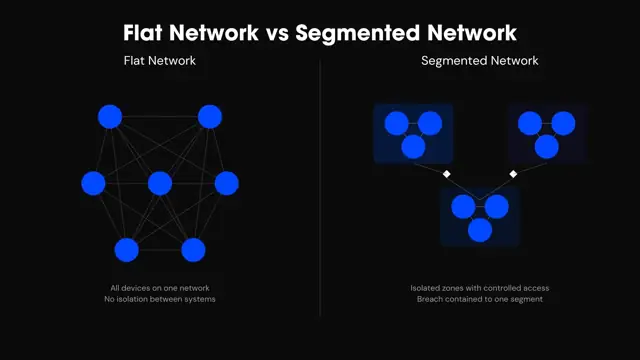 BlogWhy Every Shared Office Should Segment Its Network (VLANs Explained)Network segmentation keeps devices, tenants and guests apart so a breach in one can't spread. Here's what VLANs are, why they matter, and how we use them.
Each one is planned in writing, quoted upfront, done in stages, then supported.
 Your VPN is slow, drops out, or opens up the whole networkVPN replacementMicrosoft Global Secure Access: Entra Private Access and Internet AccessSee how it runs
 Setting up a laptop takes days, and every one is differentIntune rolloutMicrosoft Intune with Windows AutopilotSee how it runs
 Clients or insurers ask how you protect data, or Copilot is comingMicrosoft PurviewMicrosoft Purview: sensitivity labels and data loss prevention (DLP)See how it runs
Something else on your mind? Ask us directly.
Security is part of every support plan, priced per person, per month: from $85 (Essential, with Bitdefender), $159 (Advanced, with CrowdStrike Falcon Complete and daily email backup) and $189 (Premium) a person, a month, ex GST, on a 12-month agreement. Projects that close the rest of the Essential Eight, staff training and firewalls are quoted upfront. The support plans page prices your exact plan in a minute.
Cyber security is part of every Alphalogix support plan: protection on every computer, multi-factor sign-in, email and account security, and patching for apps and Windows or macOS. Advanced and Premium add daily email and OneDrive backup and a managed phone or tablet per person. Projects close the rest of the Essential Eight, such as locking down computers so only approved programs run.
We use Bitdefender on Essential, and CrowdStrike Falcon Complete on Advanced and Premium, watched around the clock by CrowdStrike’s own security team. 1Password for Business is an add-on for any plan. Staff training, firewalls and network segmentation are quoted projects.
Bitdefender, on Essential, is strong antivirus: it blocks known malware and ransomware on each computer. CrowdStrike Falcon Complete, on Advanced and Premium, does that and also detects attacks that use no malware at all, such as a stolen password being misused, and stops them: endpoint detection and response. It also comes with CrowdStrike’s own security team, watching every computer around the clock, hunting for attackers and stepping in to stop an attack: managed detection and response (MDR).
Both are set up, kept current and watched by our team.
On Advanced and Premium, CrowdStrike's own security team is watching every computer around the clock, and can stop an attack on one at any hour. Then we act within your plan's response targets: contain the affected computers and accounts, remove the threat, restore from backup where you have it, and get you working again.
Because we already look after your setup, we start from what we know, not from scratch. Afterwards we write up what happened, when and what we changed, for you and your insurer, and close the gap it came through.
The Essential Eight is the Australian Signals Directorate's eight strategies for protecting a business, such as patching applications, multi-factor sign-in, restricting admin rights and regular backups.
Every plan covers parts of it from the first day, projects take you further, and the support plans page shows exactly where each plan stands. Your Cyber Security Baseline document records what's switched on, for insurers and customers' questionnaires. Only an assessor testing each control can set a maturity level; we prepare you for that assessment.
Microsoft Defender is the protection built into Windows. On our plans, every computer gets a dedicated product that we set up and look after instead: Bitdefender on Essential, and CrowdStrike Falcon Complete on Advanced and Premium.
CrowdStrike adds endpoint detection and response: it records what happens on each computer, so an attack that uses no malware at all can be spotted and stopped automatically, and CrowdStrike's own security team watches every computer around the clock. We recommend Advanced or Premium for businesses that handle sensitive information or work in higher-risk industries.
Every mailbox gets phishing and malware filtering, links checked when they're clicked, outside email labelled, and no automatic forwarding outside the business. Your domain gets the records that stop others sending email as you.
To train your team to spot what gets through, simulated phishing campaigns are available as a project, quoted upfront.
Weak and reused passwords are one of the most common ways into a business. Most people know they should use strong, unique passwords, but without the right tool it doesn't happen.
1Password for Business is an add-on we resell and set up for any plan: every person gets an encrypted vault that creates and fills strong, unique passwords, and when someone leaves, their access is removed the day they go.
Yes, as a project, scoped and quoted upfront for any plan. Practical sessions teach your staff to spot scams, handle sensitive information and report anything suspicious, and simulated phishing campaigns show how your team responds before a real attack does.
Outdated software is one of the most common ways attackers gain access to business systems. Every unpatched vulnerability is a known, exploitable risk — and attackers actively scan for them.
Alphalogix manages patching through NinjaOne on every computer on your plan, applying security updates to Windows, macOS and common apps on a schedule, with urgent ones brought forward, so your team's work isn't interrupted.
See the standards we're working towards and the security controls we run. Our policies, certificates and named subprocessor list are available under a mutual NDA.
See more. Respond faster. Stay secure.
Find out where your business sits against the Australian Government’s Essential Eight: where you stand on each of the eight, your top three risks ranked, and the fixes that matter most. Free, and useful for cyber insurance forms.