The phone system in the cupboard
An old PABX nobody understands, and a support contract for hardware that's out of date.

 Corporate & professional servicesLaw, accounting, finance and consulting firms, where client data and uptime are the business.
 Construction & infrastructureSite offices that move every year, crews in the field, and compounds that need watching after hours.
 Logistics & warehousingDocks, yards and racking where people and vehicles share the same floor.
 Mining & resourcesMines, quarries and resources sites, where remote crews, heavy vehicles and site systems all depend on the network.
 Retail & shopping centresMany sites, small teams on each, and cameras that should be doing more than recording.
 Aged careResidential aged care and retirement living.
 Healthcare & medicalClinics and practices with patient records to protect and systems that cannot go down.

Most businesses pay three companies for phones, internet and mobiles, and none of them talk to each other. Right now, calls are being missed, and nobody is being told.
An old PABX nobody understands, and a support contract for hardware that's out of date.

Phones from one, internet from another, mobiles from a third. When something breaks, each blames the others.

Calls ring out at reception while the team works from home, and nobody knows how many were missed.
Your first step is free, with no obligation.
Then it's supported. Once you're live, your phones, internet and network are supported on your monthly plan, like the rest of your IT. See the Managed IT timeline
Send us your last phone, internet and mobile bills. We itemise every line and plan, and show you what one simpler setup would cost, side by side.
 Before you sign
Your numbers are booked to move, the new system is built around how your team takes calls, and the phones arrive ready to use.






Your calls keep coming to the old system until each number has moved. Then the new one takes over, and we're with you for the first calls.
 Go-live day
The first week shows what needs changing. We adjust the call flows, then cancel the old services so you stop paying twice.
Once you're live, your phones, internet and network are on your support plan: new starters set up, changes made, and help when something isn't right.
Every option keeps your numbers, works from the office, home or anywhere, and is looked after on your support plan. The difference is where your team answers calls.
For teams who already work in Teams all day.
For a busy reception or a small call centre.
For offices on a UniFi network that want the phones managed with it.
Your phone system works fine. Your phone lines don't.
We recommend one after the bill review, not before. Not sure? Most offices already on Microsoft 365 land on Teams Phone; a busy front desk usually lands on 3CX.
We build your call flows with you in weeks 1 to 2: who answers, in what order, and what happens after hours. Pick a time to see one.
Answered at reception. If nobody picks up in 20 seconds, it moves to the team.
The 10 things in phones & internet, in two groups. Open any of them for the detail.
Still running an old phone system in a cupboard? You're paying for hardware that's holding you back.
We move businesses from old PABX systems to cloud phones, and set up the one that fits how you take calls: Microsoft Teams Phone, so Teams becomes your phone system, with calls over Breeze Connect cloud calling connected to your Microsoft 365; 3CX, for a busy front desk with call queues, hunt groups and call reporting; or UniFi Talk, for offices on a UniFi network. 3CX and UniFi Talk calls run over Breeze Connect SIP. You keep your numbers.
Your phone system works. Your phone lines are the problem.
Keep the phone system you have and replace the old lines with Breeze Connect SIP trunks. It's the smallest change: your numbers move across, your team keeps the same phones, and you can move to a new system later if you want.
Your phone numbers are one of your most valuable assets, and changing your phone system should never mean losing them.
We handle the move from your old phone system: the numbers ported, the old system kept on until they've moved, your team shown the new phones before go-live, and the old services cancelled afterwards.
Too many tools, too many apps, too many missed calls.
We bring your calls, video meetings, chat and file sharing into one place, on Microsoft Teams or 3CX, so your team can talk and work together from the office, from home or on the road.
Your team is mobile, and its plans should be simple.
We supply business mobile plans through Aussie Broadband and Breeze Connect, set the phones up securely, and put them on the same monthly bill as the rest of your phones and internet. The same data plans power 4G/5G backup for your office internet, on the same bill.
Email scams, phone-system fraud and unsecured phones cost Australian businesses millions every year.
We lock down the phone system against toll fraud, encrypt calls between the system and the carrier, secure work phones, and put multi-factor sign-in on Microsoft 365 and Teams. Email protection depends on your support plan.
Your internet is the foundation of everything your business does. When it stops, everything stops.
We supply and look after business internet as an authorised reseller of Aussie Broadband and Breeze Connect:
Not every business needs the same internet, and the wrong one costs you every day.
We match the connection to how you work: NBN Business for most offices, fibre for faster upload, and Enterprise Ethernet, dedicated and uncontended with the carrier's service levels, for businesses that can't afford to stop. And whichever you choose, we can add 4G/5G backup so a dropped line doesn't stop the office.
Great phones and fast internet mean nothing if the network inside your office can't carry them.
We design and install business networks on Ubiquiti UniFi (and support Cisco where you already have it): switching, cabling, Wi-Fi across the office, and voice and video traffic put first so calls stay clear.
Most phone and internet providers connect you and walk away. We stay.
Once you're live, your phones, internet and network are supported on your monthly plan: monitored, updated, new starters set up, and help for your team whenever they need it.
 BlogFive signs someone else is in your Microsoft 365 mailboxMissing emails, rules you didn’t make, sign-ins you don’t recognise. Five signs a Microsoft 365 mailbox has been taken over, and what to do in the first hour.
 BlogThe First 10 Minutes of a Network Outage — What a Good IT Partner DoesEvery business hits a network outage eventually. What separates a good IT partner from a bad one isn't avoiding it — it's how they respond in the first 10 minutes. Here's what good looks like.
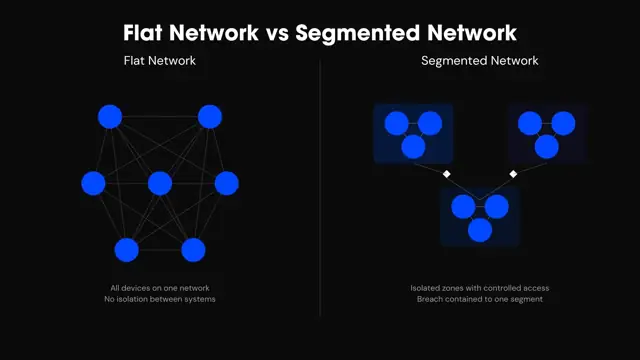 BlogWhy Every Shared Office Should Segment Its Network (VLANs Explained)Network segmentation keeps devices, tenants and guests apart so a breach in one can't spread. Here's what VLANs are, why they matter, and how we use them.
Each one is planned in writing, quoted upfront, done in stages, then supported.
 You're moving office, or your network is past its bestOffice move or upgradeOffice IT relocation and UniFi build: UniFi Network, Access, Talk and ProtectSee how it runs
 Your phone system, or its contract, is endingMove your phones to TeamsMicrosoft Teams Phone over Breeze Connect cloud callingSee how it runs
Something else on your mind? Ask us directly.
It means every way your business talks (phone calls, video meetings, chat and file sharing) in one place instead of five apps and five bills. We deliver it on Microsoft Teams or 3CX, with internet through Aussie Broadband or Breeze Connect.
Yes. We move businesses from old PABX systems to cloud phones on Microsoft Teams Phone or 3CX. We port your numbers, keep the old system on until they've moved, show your team the new phones before go-live, and cancel the old services afterwards.
Yes. Local numbers, 1300 and 1800 numbers can all be ported to your new system. We handle the porting (for Teams calling, to Breeze Connect), and your calls keep coming to the old system until each number has moved.
Through Aussie Broadband and Breeze Connect: NBN Business, fibre, and dedicated Enterprise Ethernet for businesses that need uncontended bandwidth with the carrier's service levels. We can add 4G/5G backup: a router with 4G/5G built in that keeps you online over the mobile network if the main line drops.
Without a backup, the office stops: email, cloud files and Teams calls all go with the line. With 4G/5G backup, your router switches to the mobile network on its own, and your team keeps working. When the main line comes back, it switches back. We supply the data plan through Aussie Broadband or Breeze Connect, test the switch-over when we install it, and look after it on your support plan.
Teams Phone turns Microsoft Teams into your business phone system, so your team makes and takes calls on your business numbers from the Teams app on a computer or phone. If you already use Microsoft 365, it's usually the simplest way to replace an old phone system without adding another app.
3CX is a business phone system that runs in the cloud, with its own desk-phone, computer and mobile apps. It suits businesses that want a phone system separate from Microsoft 365, or need features like call queues, hunt groups and call reporting for a front desk or a small call centre. We'll recommend Teams Phone or 3CX after the review, not before.
UniFi Talk is Ubiquiti's business phone system. It runs on your UniFi network, alongside your Wi-Fi, cameras and door access, with touchscreen desk phones and an app. We set it up with calls carried over Breeze Connect SIP, and you keep your numbers.
Yes. If your phone system is working well, we can replace the old lines with Breeze Connect SIP trunks. Your numbers move across and your team keeps the same phones. If you want a new system later, the numbers are already with Breeze Connect.
Yes — and this is one of the biggest advantages of modern unified communications. Both Microsoft Teams Phone and 3CX include fully featured mobile and desktop apps, meaning your team can make and receive business calls from their laptop or mobile phone regardless of where they are working.
Your customers call your business number and your team answers — from the office, from home, or from anywhere in the world.
Yes. We supply business mobile plans through Aussie Broadband and Breeze Connect, set the phones up securely, and put them on the same monthly bill as your phones and internet, so you never deal with a carrier directly.
Alphalogix supplies and supports a full range of business desk phones from the world’s leading manufacturers — Yealink, Poly, Cisco, SNOM, and Ubiquiti UniFi — covering everything from standard desk handsets and executive phones through to conference room speakerphones and wireless DECT handsets.
All hardware is pre-configured by our team before delivery, meaning your phones arrive ready to use straight out of the box.
We lock down the phone system against toll fraud, encrypt calls between the system and the carrier, secure work phones, and put multi-factor sign-in on Microsoft 365 and Teams. Email protection comes with your support plan, and how much depends on the plan you choose.
See more. Respond faster. Stay secure.
Send us your last phone, internet and mobile bills. We itemise every line and plan, and show you what one simpler setup would cost, side by side. You keep your existing numbers.