
Almost 20 years in IT, and coding has never been something I’ve actually done. That’s not false modesty — it’s the honest starting point for this entire series.
I’ve been using Claude Pro for about two months now, and I’ve genuinely hit my usage limits — that’s how much this has become part of how Alphalogix operates day to day. In that time, two internal tools have gone from a described idea to fully working software: a CapEx/OpEx quoting calculator for client engagements, and a full Work Breakdown Structure project estimator for scoping multi-site projects.
Neither of these exists because I hired a developer or bought expensive project management software that half-fits how we actually work. They exist because I understand my own business better than any outside developer would, and AI turned out to be a genuine development partner — not a shortcut, an actual collaborator capable of turning a described process into structured, working software.
This is Part 1 of a series documenting that journey properly — including the parts that are still a work in progress.
Why We Started Building Our Own Tools
Working across large private and public sector organisations for years, I saw plenty of applications come through — how they integrated, how they overlapped, how workflows got adapted around whatever software the business had adopted. At some point the obvious question surfaced: why couldn’t the same thing happen for my own business, built around processes I already understood completely?
The barrier had always been the traditional path — commission custom development, wait, pay significantly, and hope the result matches what you actually needed. For an internal tool, that equation rarely made sense. So the experiment was simple: try building it with Claude instead, starting with the sales and quoting process that touches every new client engagement.

Tool One: A CapEx/OpEx Quoting Calculator
As an MSP, every new client conversation eventually needs two numbers: the operational expenditure (the ongoing monthly cost of supporting them) and the capital expenditure (the once-off setup and hardware cost to get them there). Quoting both accurately, consistently, and quickly across different-sized engagements is a genuinely fiddly problem — and the tool built to solve it now handles the entire process.
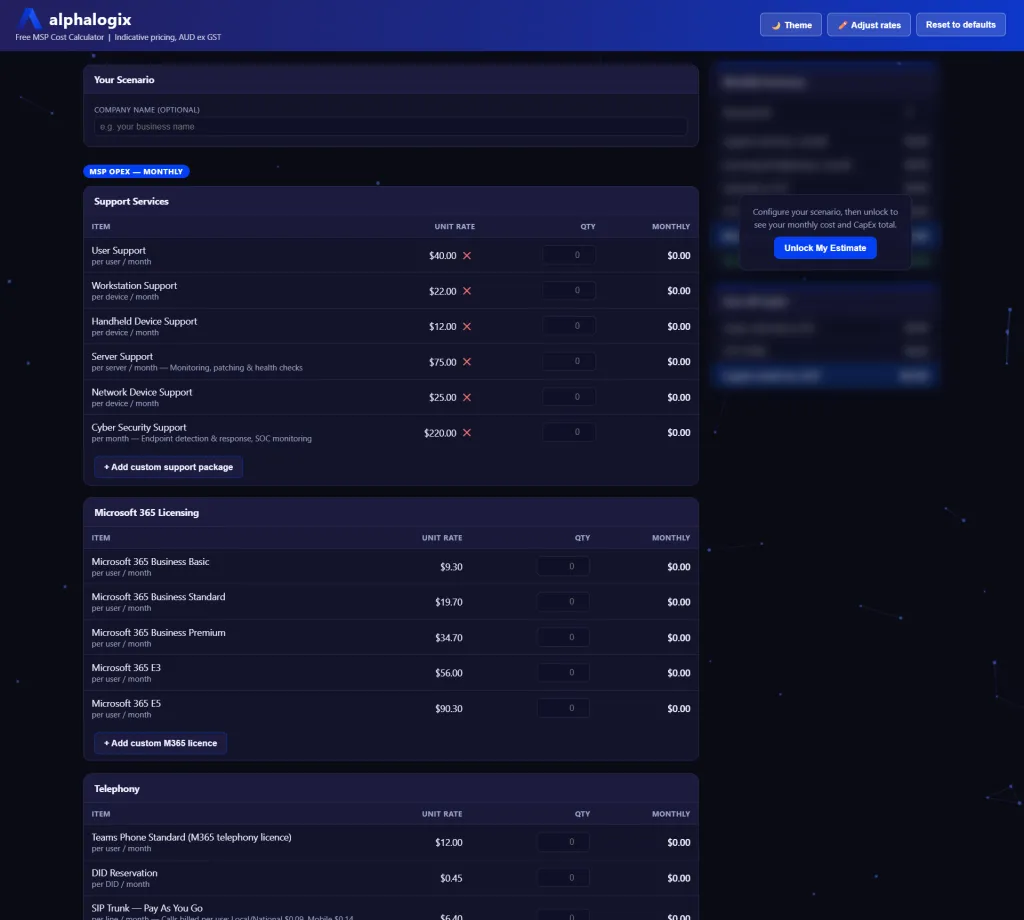
Onboarding a new prospect starts with the basics — number of users, workstation support requirements — and the calculator builds the quote in real time as each element is added. Standard licensing gets added the same way, and custom line items can be created for anything outside the standard catalogue — a specific security product like CrowdStrike Falcon at its own monthly rate, for example, sitting cleanly alongside the standard components.
The CapEx layer works the same way for once-off costs — hardware, initial setup, anything that isn’t an ongoing monthly charge — with GST calculated automatically into the total. A discount percentage can be applied where needed, and every line item remains fully editable if a quote needs correcting or adjusting after the fact. Once a quote is finalised, it exports cleanly to CSV or prints directly to PDF — ready to send.
The feature that adds the most genuine value sits beyond the immediate quote: a five-year cost outlook, projecting the total cost of ownership across the life of an engagement, with a 3% CPI adjustment built into the calculation. Instead of quoting a single number, a prospective client can see exactly what year one costs, and what the relationship looks like financially over five years — a materially more useful conversation than a single up-front figure.
Security First, Every Time
An internal tool modelling client pricing is still handling commercially sensitive information, regardless of how casually it started as a side project. That’s not a reason to slow down — it’s a reason to build security in from the beginning rather than retrofitting it once the tool is already in daily use.
Single sign-on and authentication
The calculator is hosted with single sign-on tied directly to the company’s Microsoft 365 tenant — meaning access is restricted to genuine company accounts, not an open link anyone could stumble onto. Testing this properly matters: attempting to log in from an account outside the tenant is refused outright, with no path in regardless of how the login is attempted. Only a real, authorised company account gets through.
Why this matters for internal tools specifically
The principle is straightforward: build the security layer before deploying anything, not after. Left unsecured, an internal tool handling business-sensitive data is exactly the kind of overlooked entry point that gets found and exploited over time. Treating an internal side project with the same security discipline applied to client-facing systems isn’t optional extra effort — it’s the baseline.
Tool Two: A Work Breakdown Structure (WBS) Project Estimator
The second tool tackles a different problem — estimating cost and effort for project-based engagements, using the Work Breakdown Structure methodology applied across many client project deliveries over the years.
The estimator starts with roles — field engineers, infrastructure specialists, project managers, coordinators, trainers, and whatever other resource types a given project needs — each with its own day rate. Add the estimated hours or days required for each role, and the tool calculates individual and rolled-up costs automatically, whether quoting in half-day or full-day increments.
Beyond resourcing, the tool includes template-driven task categories that mirror how a real project actually unfolds: design, customer user acceptance testing (UAT), training, and service enablement once a project goes live. A percentage-based overlay handles project management and technical assurance time across relevant tasks, and a project wrap-up phase closes out the estimate.
Critically, the tool scales to multi-site engagements — a project spanning several sites, each with its own resourcing, tasks, and costs, rolling up into a single overall project estimate. It’s built to handle everything from a single-site engagement through to a project spanning twenty or more locations.
Once an estimate is built, it exports two ways: as XML directly into Microsoft Project desktop, generating a full project view complete with resource names and costings, and as an Excel spreadsheet with the complete WBS breakdown, task dates, and total project cost. One estimation feature is still actively being refined — a genuinely honest, in-progress part of the story rather than a polished final product.
Try It Yourself — Free Calculator
A free version of the CapEx/OpEx calculator is available for anyone who wants to try it directly.
Free MSP Cost Calculator — Alphalogix
If you’re an MSP or IT business owner who’s ever wished for a faster, more consistent way to quote new client engagements, this is worth trying — no cost, no obligation.
What This Means If You’re Considering Building Your Own Tools
The barrier to building genuinely useful, custom internal software has dropped substantially — but a few things are worth understanding before you start.
You don’t need to be a developer anymore, but you still need to think about security like one. The ease of building something functional can create a false sense that the hard part is over once it works. Authentication and access control need deliberate attention from day one, not as a fix applied once something is already in daily use.
Start with a process you already understand completely. The tools worth building are the ones solving a problem specific enough that off-the-shelf software genuinely doesn’t fit — a sales quoting process, a project estimation method, something built around exactly how your business actually operates.
Treat the first version as a working draft, not a finished product. Both tools described here are still evolving. That’s not a weakness in the approach — it’s the actual value of it. Build a working first version, use it for real, and refine it as genuine use reveals what’s missing.
This Is Part 1 of a Series
This is the first entry in an ongoing series documenting how Alphalogix builds and uses its own internal software. More tools, more of the actual process — including the parts still being refined — are coming in future episodes.
If you’re a business owner sitting on an idea for an internal tool that’s never quite justified a full custom software project, this series is for you.
See More. Respond Faster. Stay Secure.
If you’re exploring what’s possible for your own business — whether that’s a custom internal tool, better security around an existing system, or simply understanding where AI-assisted development might genuinely help — we’re happy to talk it through.
No obligation, no lock-in, honest advice.
Alphalogix is a Sydney-based managed IT company.
alphalogix.com.au